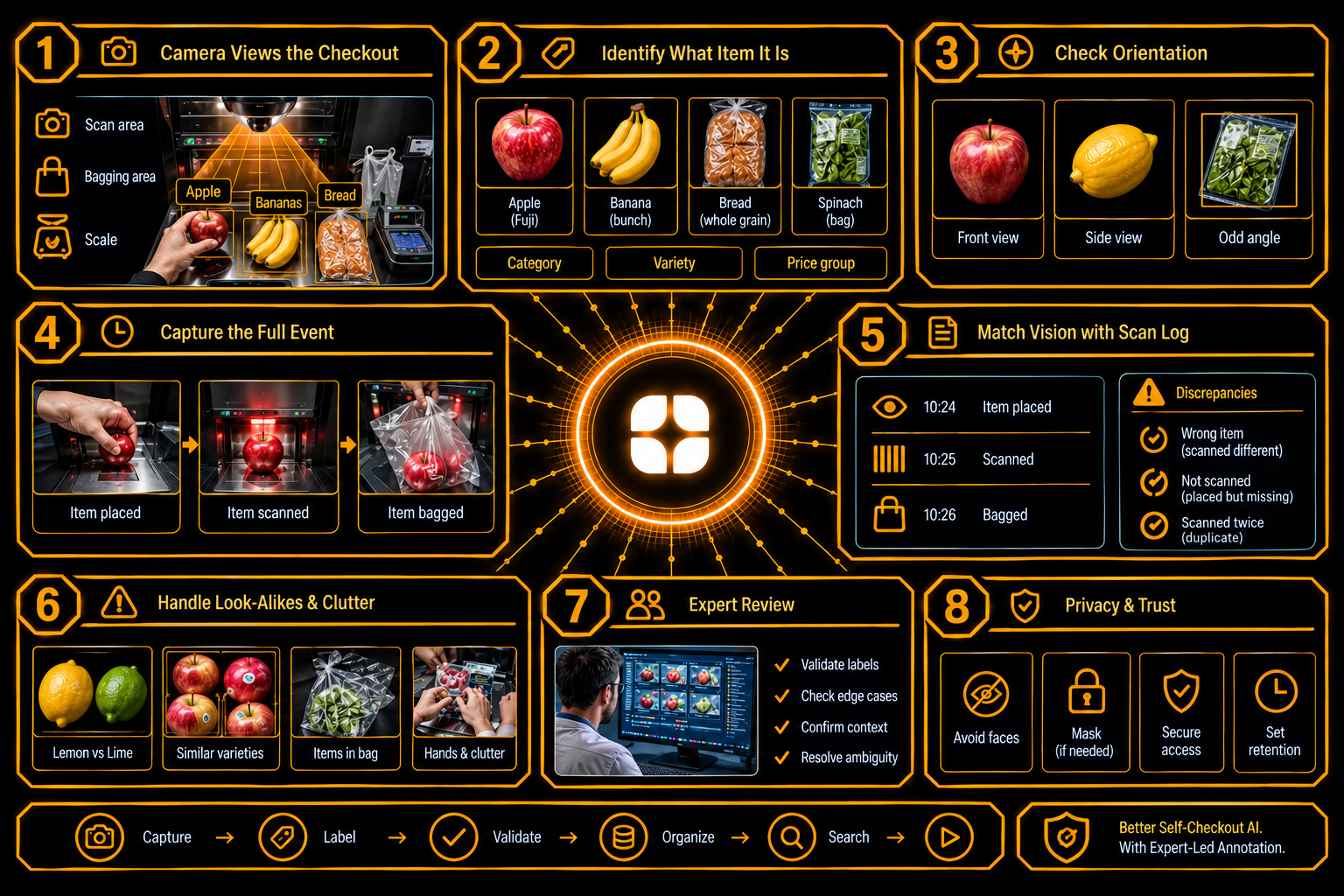
Most items at a self-checkout have a barcode, and the scanner handles them. A few do not. Loose fruit and vegetables, bakery items, and unwrapped goods have to be identified some other way. Many stores now add a camera that looks at the scanning area and recognizes what the shopper puts down.
That camera is only as good as the labels behind it. Self-checkout item recognition is a labeling problem with its own difficulties: hands covering items, crinkled plastic bags, and fruit that looks almost identical. This post explains what the labels need to capture, why granularity matters, and why labels should describe what happened and never guess at why.
Checkout cameras are mounted above the scanning area and the bagging area, looking down at a small, busy space. Hands move items across the scanner. Bags are filled. Scales weigh produce. The lighting is bright and fixed, but the surfaces are shiny, and the shopper's body often blocks part of the view.
The first question is how specific the item label should be. "Apple" is a category. A named variety is more specific. A priced item, such as an organic apple of a certain variety, is more specific still.
The right level depends on how the store prices things. If two varieties that look alike are priced differently, the label has to separate them. If they share a price, one label may do. Fresh produce recognition data should match the store's own item list, and the guidelines should state which level each label uses.
Produce is full of near twins. Lemons and limes differ in color, but under store lights the difference can shrink. Several varieties of one fruit are hard to tell apart. Organic and conventional versions of the same item look identical, apart from a small sticker.
Annotators need reference images for each item the store sells, including the awkward pairs. They also need a rule for items that cannot be told apart from the camera view. A label of "ambiguous between these two" is more honest than a guess, and it tells the system when to ask the shopper.
The shopper's hands are the biggest obstacle. They hold items, cover them, and push them across the scanner.
Plastic bags add glare and crinkles. Clear bags show what is inside, but distorted. Opaque and reusable bags hide it.
Annotators need rules for how much of an item must be visible before it can be labeled, how to handle items inside clear bags, and how to mark each item when several appear at once. A visibility label, recording how much was visible, helps the team understand where the model struggles.
The checkout also keeps a log of what was scanned and when. Vision labels are most useful when they line up with it.
Annotators label events along a timeline: an item is placed, an item is scanned, an item moves to the bag. The labels are then compared with the scan log. Clocks may be slightly out of step, so the project needs to know the offset between the camera and the register, and record it.
When the vision labels and the log disagree, the difference falls into a few categories: the item shown is not the item scanned, an item was placed and never scanned, or an item was scanned twice. Checkout video annotation should name these categories and keep them separate.
This point deserves care. A mismatch between the camera and the log does not mean a shopper meant to do anything wrong. Shoppers make honest mistakes. They fumble items, scan one twice, or cannot find the right code for loose produce. Some are older or have difficulty using the machine.
Labels should describe observable events only: "item placed, not scanned." They should never assign intent. A mismatch is a reason for a person to look, not a conclusion.
This is both fair and practical. A system trained on intent labels would learn to treat ordinary mistakes as something else, and false alerts damage trust with the very shoppers a store wants to keep.
Packaged items cause fewer problems, but they still cause some. A shopper may hold a box so the barcode faces away.
Guidelines should tell annotators how to handle packages seen from odd angles, and how to flag packaging they do not recognize, so the item list can be updated.
Checkout footage can show faces, hands, and sometimes payment cards. Projects should decide early whether the camera is angled to avoid faces, whether faces are masked, who can see raw footage, and how long it is kept.
People who work in store operations, produce departments, or retail technology read this footage differently. They know which items are easy to confuse, how items are priced and coded, and what honest mistakes look like. They know that a hand over an item does not mean anything on its own.
They also write the rules that keep a large team consistent: the item list, the label level, the visibility rules, and the event categories. This matches Globik's approach of using verified domain experts for work that depends on judgment. For retail checkout AI training data, that experience helps keep the system accurate and fair.
Before a checkout labeling project starts, a team can settle five things:
Checkout AI works when labels match the store's item list, handle hands, bags, and look-alikes honestly, line up with the scan log, and describe events and never motives. For another example of labeling for retail, see our guide on fashion image attribute labeling: necklines, sleeves, patterns, and color names. Strong self-checkout item recognition depends on people who know how stores work.
Self-checkout item recognition is the use of cameras and AI to identify items without barcodes, such as loose produce, at a checkout.
The item label level matters because items that look alike may be priced differently, so labels must match the store's price structure.
Checkout labels should describe events only, because a mismatch with the scan log can come from an honest mistake.
Hands and bags hide or distort items, so annotators need visibility rules and a record of how much of each item was seen.
Aligning vision labels with the scan log shows when the item seen differs from the item scanned, so a person can review the case.