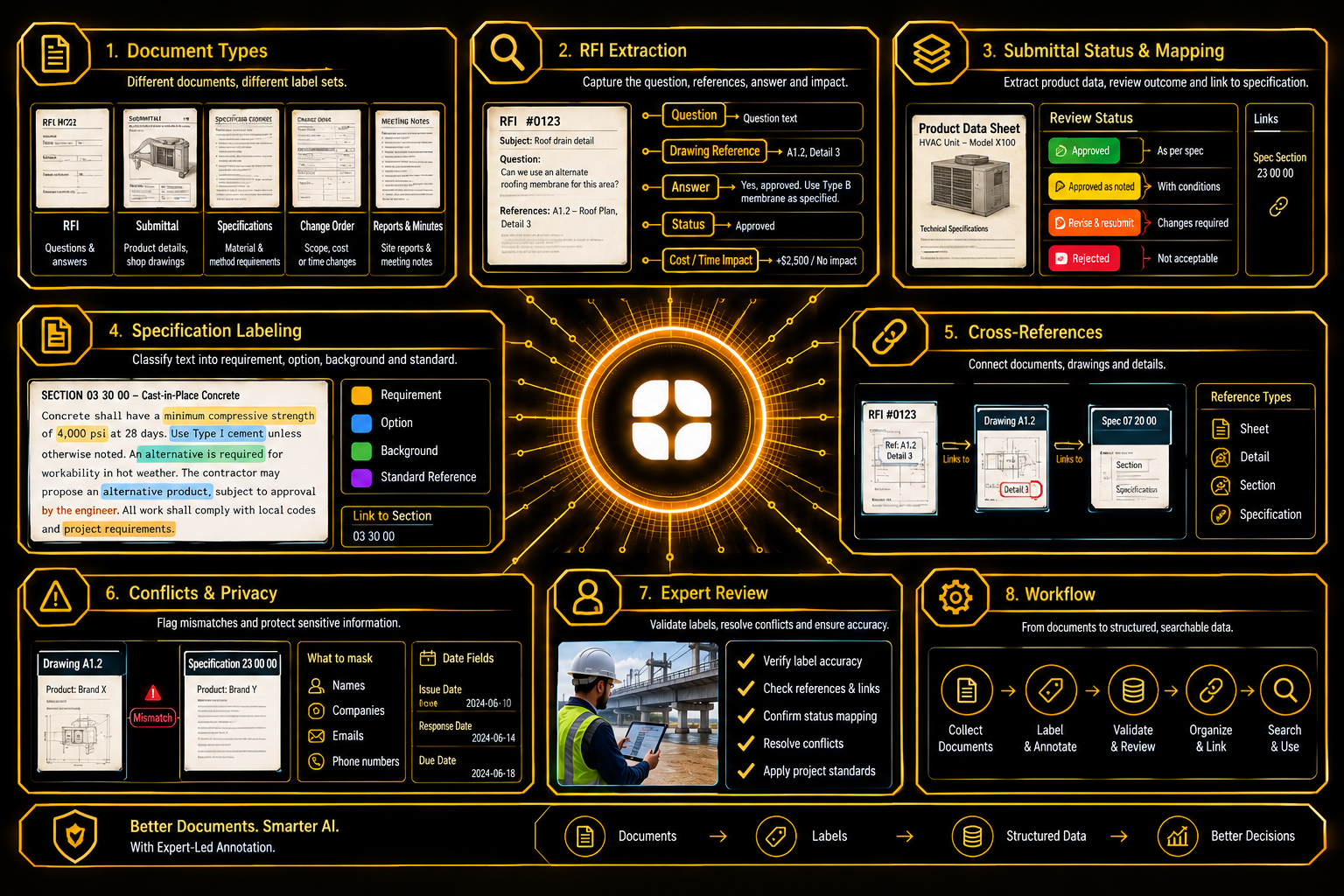
A large construction project produces documents faster than anyone can read them. Contractors send questions to designers. Suppliers send product details for approval. Specifications set out what materials and methods are required. Meeting notes and daily reports record what happened on site. The answer to a simple question, such as "what did the engineer decide about this wall?", can sit in any of them.
AI can search and connect these documents, but only if it learns from labeled examples. Construction document annotation is the work of marking what each document says, who it concerns, and where it points. This post explains what the labels need to capture and why people from the industry label them best.
Project paperwork comes in several families, and each needs its own label set:
A question in an RFI and a requirement in a specification are different kinds of statements, and a model must learn which is which.
An RFI is a small package of information. It poses a question about a particular part of the design, points to the drawings or specification sections involved, and receives a response.
RFI data extraction labels each of those parts: the topic of the question, the references it cites, the answer, and the current status. It also records any impact the RFI claims on cost or time, since that is often what project managers want to find first.
Several things complicate the work. One RFI may raise more than one question. An answer may say only "see drawings," which is a pointer, not a response. A reply may change the question that was asked. Annotators need rules for splitting multiple questions and for labeling answers that decide nothing.
Before a product is installed, the contractor often submits its details for review. The reviewer responds with a decision, which controls whether the work can proceed.
Review outcomes appear under many names. One project may say "approved," "approved as noted," "revise and resubmit," and "rejected." Another uses numbers or letters. For submittal status labeling, the project should define a common set of statuses and map each document's wording onto it. The original wording should be kept alongside the mapped label.
Comments matter too. "Approved as noted" carries conditions, and those conditions must be captured and linked to the product they affect. A label that records only the status loses the conditions that make it meaningful.
Each submittal should also link to the specification section that required it. That link lets a model show everything submitted against one requirement.
Specifications are long, formal, and highly structured. They are divided into parts and sections, and the sentences inside carry different kinds of weight.
Some sentences state a requirement: the contractor must do something. Others allow an option, such as an "or equal" product. Others only give background. Annotators label which is which, because a model that treats a permitted option as a requirement, or the reverse, gives the wrong answer.
Conditional statements add difficulty: "where this applies, provide that." The label has to capture the condition along with the requirement it governs.
Specifications also refer to external standards by name. The right label records the reference as a reference. It does not try to interpret what the standard says. This is document labeling, not legal or engineering advice.
Much of the value lies in references. A sentence in an RFI or a meeting note might say "refer to detail 5 on the third-floor plan" or "as required by the concrete section." Those phrases connect documents to each other.
Annotators mark each reference and its target, whether that is a sheet, a detail, a specification section, or another document. Several targets may appear in one sentence. Some references are relative, like "as shown above," and need context to resolve. Others point to something that cannot be found.
Unresolved references should be labeled as unresolved, not guessed. A model that invents a link will lead a user to the wrong drawing.
Drawings and specifications sometimes say different things. A specification may call for one product while a drawing note names another. Projects have rules, often written into the contract, about which document takes precedence.
Annotators should not settle these conflicts. They should record what each document says and flag the mismatch for someone with project authority. Treating conflicts as findings keeps the data honest and gives managers something useful.
Project documents are full of names, companies, and email addresses. Projects should decide early what is masked and who may see the raw files.
Dates need care. A document may carry an issue date, a response date, and a due date, and the gap between them is often the point. Labels should keep these separate, so a model can tell when a response was late.
People who work in project controls, document management, or site engineering read these documents differently. They know what an RFI is really asking, understand why an "approved as noted" status needs its notes, and can tell a requirement from a permitted option. They also write the rules that keep a large team consistent: the document families, the status mapping, and the reference types.
This matches Globik's approach of using verified domain experts for work that depends on judgment. For construction project AI training data, that experience is what makes search and linking dependable.
Before a construction document project starts, a team can settle five things:
Construction document AI works when labels capture questions, requirements, statuses, and references accurately, and flag conflicts instead of settling them. For an image-based example from the same kind of projects, see our guide on bridge and concrete structure inspection imagery: cracks, spalling, and exposed rebar. Strong construction document annotation depends on people who know how projects run.
It is the labeling of project documents so AI can find questions, requirements, statuses, and references.
It is a request for information, a question from the site to the design team about the drawings or specifications.
Projects name review outcomes differently, so a shared set lets documents be compared.
A model that confuses a permitted option with a requirement will give wrong answers.
Precedence is decided by project authority, so annotators should record the mismatch and not settle it.