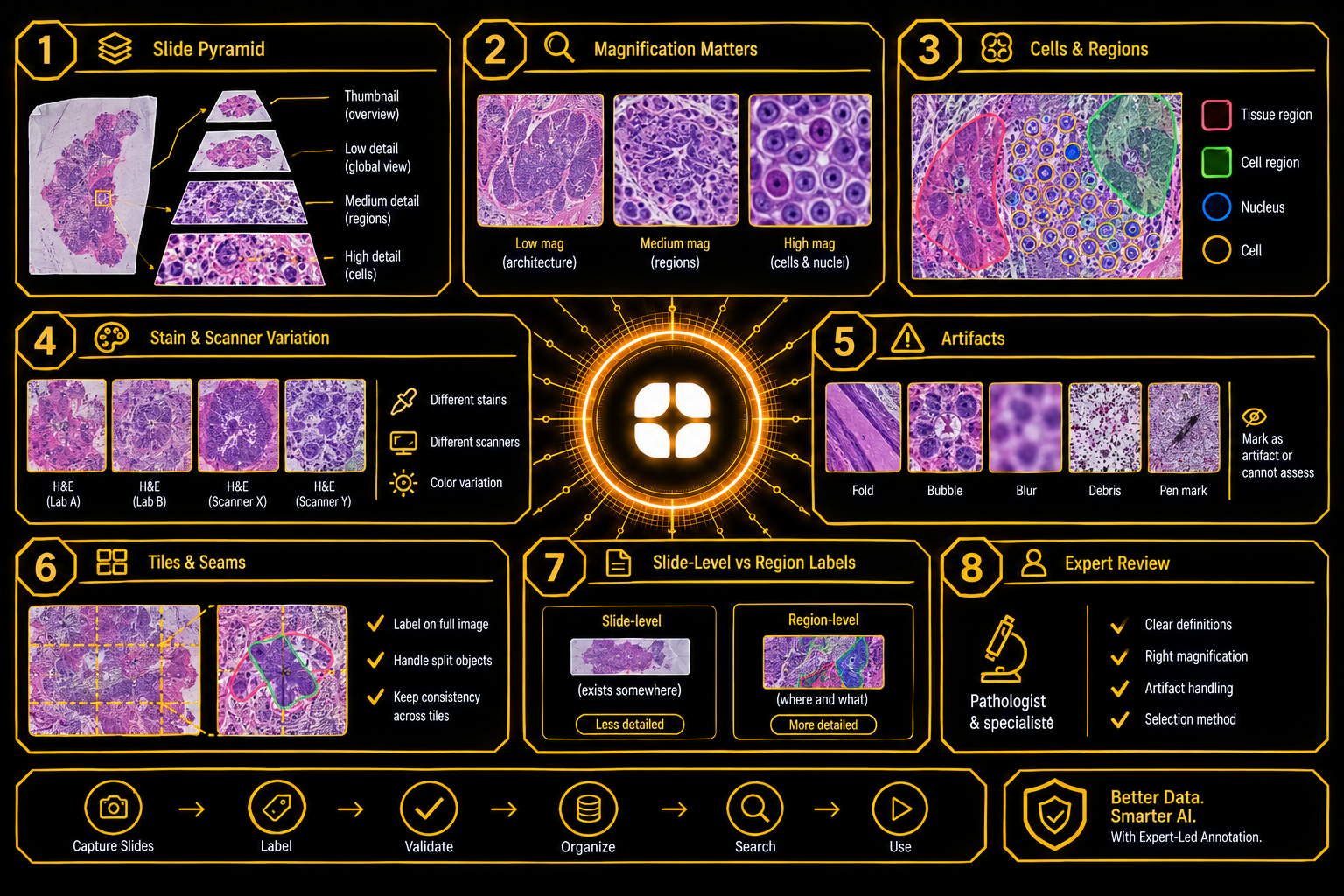
When a tissue sample is taken for examination, it is cut into thin sections, stained, and placed on a glass slide. A pathologist studies it under a microscope. In digital pathology, the slide is instead scanned into a computer, and the result is an image of extraordinary size. A single slide can contain billions of pixels.
AI can help by counting cells, outlining tissue types, and pointing a pathologist to areas worth a closer look. It learns from labeled slides, and slides are unlike any other kind of image. Digital pathology annotation is the work of producing those labels. This post explains what makes slide images difficult, what the labels need to capture, and why the details matter. AI supports pathologists, and the diagnosis stays with them.
A scanned slide, often called a whole-slide image, is not stored as one flat picture. It is a pyramid. The bottom holds the full-detail image, where individual cells are visible. Above it sit smaller, lower-detail versions, down to a thumbnail that fits on a screen.
This changes how labeling works. A project has to say which level an annotator labels on, because outlines drawn at one level of detail look different at another.
Some decisions can only be made at high magnification, and others only at low. The overall layout of the tissue, such as where one type ends and another begins, is clear when zoomed out. The shape of a nucleus is clear only when zoomed in.
A good protocol specifies the magnification for each task and records it with the label. If annotators outline tissue regions while zoomed in too far, they lose the pattern. If they judge cells while zoomed out, they guess.
Slide labels come in two main forms. Whole-slide image annotation at the region level outlines areas of tissue: one type here, another type there. Cell-level annotation marks individual cells for counting or classification.
A small field can contain hundreds of cells, packed together and overlapping. Cell and nuclei annotation raises questions that need written answers:
Without rules, counts differ between annotators, and any measurement built on them is unreliable.
Slides are stained so that tissue shows up, and the color varies. Different labs use slightly different recipes. Stains fade over time. Scanners from different makers render color differently. The same tissue can look pink and crisp in one image and purple and washed out in another.
A model trained on slides from one lab may do worse on another, because the colors differ, not because the tissue does.
For annotation, two things help. Records should note the source of each slide, such as the lab and the scanner. Guidelines should include examples from different sources, so annotators learn that a change in color is not a change in tissue.
Slide preparation is delicate work, and it leaves marks. Tissue can fold or tear. Air bubbles get trapped under the cover. Parts of the slide may be out of focus. Dust, stain particles, and pen marks from the lab appear in the image.
These are artifacts, not findings. Annotators should label them as such, or exclude the areas, and the guidelines should show examples. A model that learns from a fold as if it were a tissue feature will see folds everywhere.
Out-of-focus regions deserve a rule. If the image is too blurred to judge, the honest label is "cannot assess."
A gigapixel image is too large for a model to process at once. It is cut into small tiles, and the model looks at each tile separately.
That creates a labeling problem at tile edges. A cell or region that crosses the boundary is split in two. Annotators should label on the full image, not tile by tile, and exports should handle splits consistently.
Often the only label available is for the whole slide: a slide is marked as containing a certain type of finding, but not where. This is cheap to collect and far less informative than a region outline.
Slide-level labels can still be used, but the team must know what they are. They say that something exists somewhere. They do not teach a model what it looks like or where to find it. Where location matters, region labels are needed, and the project should decide how much of each it can afford.
A slide is vast, and labeling all of it is rarely practical. Projects therefore select areas to label. How they choose matters.
If annotators pick only the clearest, most typical areas, the data will be biased toward easy examples. Protocols should describe how areas are chosen, include difficult and borderline regions, and record the selection method, so users of the data know what it represents.
Pathologists and histotechnologists read slides differently from other people. They know what normal tissue looks like at each magnification, recognize artifacts at a glance, and understand why stain differences do not change the tissue. They write the protocols that keep a team consistent: magnification levels, cell definitions, region rules, and artifact handling.
This matches Globik's approach of using verified domain experts for work that depends on judgment. For pathology AI training data, that experience makes labels reliable enough to build on.
Before a pathology project starts, a team can settle five things:
Digital pathology AI works when labels are made at the right magnification, define cells and regions clearly, allow for stain differences and artifacts, and record how areas were chosen. For another example of labeling medical images with careful protocols, see our guide on radiology image annotation: segmenting findings, not just organs. Strong digital pathology annotation depends on people who read slides every day.
It is the labeling of scanned tissue slides so AI can learn to recognize cells and tissue types.
Some decisions need a wide view and others a close one, so each task has a set level.
Labs and scanners render color differently, so a model can fail on slides that simply look different.
They are folds, bubbles, blur, and debris from slide preparation that should not be labeled as tissue.
Choosing only easy areas biases the data, so the selection method tells users what it represents.